The online branch is open around the clock. For influencers, smaller companies and start-ups, an online shop still offers excellent sales opportunities. The big question is: Which shop software is the best in e-commerce?
Table of contents:
- Types of online shops
- Advantages and disadvantages of the shop systems
- A shop system should have these functions
- When does external support make sense?
Frequently asked questions about selecting shop systems
The particularly popular shop systems for small and medium-sized businesses include: Shopify, Shopware, WooCommerce, IONOS and Strato.
An alternative to your own shop system can be using a marketplace. Amazon, eBay or trading platforms like Otto enable trading companies to operate and sell there.
In addition to adhering to compliance (GDPR) and notice periods, it is important to pay particular attention to the fees and calculate them precisely. Is there just a monthly flat rate? Or do you have to pay a percentage of sales? How does this affect the margin? In the end, the shop should be worth it.
A list of all the shop solutions that companies can choose between would be long. And the list probably wouldn’t be complete even after hours of work. Trade magazines regularly compare shop systems with each other. But in order to benefit from this for your own project, you should already have made a fundamental decision for a certain type of shop.
What types of online shops are there?
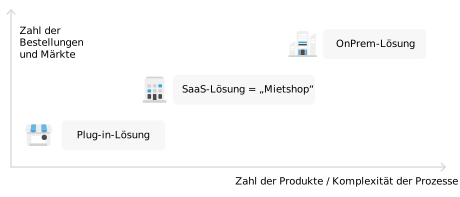
Shop systems differ not only in their functions, but also in the way they are operated. Here there are:
- Plug-in solutions: There are a whole range of extensions for well-known and widespread content management systems that can be integrated into the core system. So you expand the possibilities of the website with the functionality of a shop. A well-known example is WooCommerce, which was developed for the popular WordPress.
- SaaS solutions: The abbreviation stands for “Software as a Service” and means a service (in this case a shop) that does not run on your own infrastructure. Many providers, but also other companies, offer such rental shops as an independent solution. An example of one SaaS solution is Shopify . Depending on the provider, a monthly fee is charged for use, which is often based on sales.
- On-prem solutions: By “on premises” IT means systems that are operated within its own data center and therefore also run on its own hardware.
Of all the options, on-prem solutions offer the greatest design freedom. This applies equally to appearance and functionality. Provided you have the appropriate know-how, you can design a completely individual shop whose processes fit your own company perfectly. However, development also costs time, resources and therefore money.
What advantages and disadvantages do the shop systems have?
The biggest advantage of on-prem solutions is without a doubt the greater flexibility compared to all other approaches. But that is also the biggest disadvantage. The necessary prerequisites for operation must be created, i.e. a suitably sized server with an Internet connection must be available. In addition, all development processes (optical design, functional adjustment, connection to payment systems, updates, data backup, etc.) are carried out by the trading company itself. On-prem (today preferably installed on cloud servers) is therefore something for companies with a corresponding budget and a large number of items.
The advantage of a plug-in solution is that it usually fits the CMS perfectly. The shop visually fits into the existing website and the operation in the backend is also familiar. However, a plug-in also “inherits” all problems from the underlying CMS, such as security gaps. If there are many orders and products, using the same database can also have a negative impact on performance.
A good compromise between the two worlds are “rental shops”, i.e. SaaS solutions. The infrastructure is already in place and numerous required functions are immediately available. In addition, the provider companies strive to make the operation and design of the shops easier through editors and drag & drop. When it comes to design, however, not all ideas or specifications from the existing website can be easily transferred.
What functions should a shop system have?
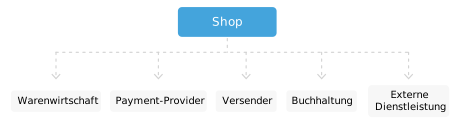
Which functions and in what depth the new online shop should have depends, among other things, on your own experience and the number of people ordering and products offered. However, there are a number of functions that companies that are entering e-commerce for the first time should pay attention to:
Sell DVDs on Amazon
- GDPR compliance: Customers’ personal data should be processed and protected in accordance with the requirements of the GDPR. Provider companies often confirm this by presenting a certificate.
- SSL connections: The connections to the shop should be encrypted and secured. Recognizable by the lock symbol in the browser address bar.
Payment and billing
- Different payment methods: Of course, at the end of the order, those who place the order also want to pay. Sending against an open invoice carries a high risk of default. That’s why the shop should already have a number of common payment methods that are best easy to activate. Installment purchases, credit card payments and transfers can be processed with PayPal, Klarna, Amazon Pay or Stripe. That’s a good starting point to start with.
- Accounting features: The shop system should be able to generate invoices and also offer VAT rates for different regions. In addition, the data should also be able to be quickly transferred into accounting programs.
Shipping and customer management
- Physical goods must reach customers. The shop should therefore already contain interfaces to shipping services such as DHL or UPS in order to be able to arrange the order and also create labels. In addition, correct shipping costs are displayed to the person ordering and can be calculated.
- Customers should be able to create an account so that they can view their own order history or maintain wish lists. Storing master data also makes follow-up orders easier. In addition, the data can also be used by the shop provider for marketing.
Offer maintenance
- Simple item entry: Maintaining the inventory with quantities, photos and descriptions should be as intuitive as possible. It also makes sense to enter an EAN or GTIN if the shop later appears in price comparison portals.
- Merchandise management: If no own inventory management is used, the shop must at least be able to manage the quantities created in order to automatically deactivate offers so that customers cannot order them even though the shop is not able to deliver.
- Bulk import: If you are dealing with a larger number of items, an import function makes sense in order to be able to read in the data from manufacturers, among other things.
layout
- Mobile is a must: Today, the shop simply has to look appealing on mobile devices and be easy to use. Everything else no longer makes sense.
- Simple editor: When designing the visual design of the shop pages, it is useful if this is done with an easy-to-use editor that does not require any programming knowledge. Ideally, it allows experienced people to work directly on the code.
Statistics and Marketing
- Success measurement: Sales, number of orders, well-performing products – a shop produces a number of indicators that can be used to determine success. These numbers are best brought together in a clear dashboard.
- SEO, special sales, marketing campaigns: The shop should attract new customers and make best use of an existing base. That’s why the set of functions includes, on the one hand, options for search engine optimization and, on the other hand, functions that allow a targeted approach to existing customers, for example through newsletters or issuing vouchers.
These are all just initial indications. What exactly is desired and whether that is enough depends on your own ideas and goals. Multilingualism is not a must per se, but is necessary if it is clear that sales are to be made in several target regions.
When does external support make sense?
Self-employed and smaller companies can quickly enter the world of e-commerce with a SaaS shop or a plug-in for the existing CMS. However, it may make sense for you to seek support from external specialists. If you want to sell in different countries or if the number of items can only be processed with a lot of manual effort, it is recommended to work with agencies. This is the only way to achieve scaling.