The online payment system Paypal has now established itself primarily in online shops and is frequently used. Customers and retailers alike value both the security and the speed with which the system works.
Unfortunately, how to deal with it is often unclear Paypal transactions from an accounting perspective, i.e. Paypal accounting. Unfortunately, serious mistakes are made here again and again.
These can be avoided if you realize that in accounting terms Paypal is nothing more than a bank account that has to be booked in the same way as your house bank.
Nevertheless, there are a few pitfalls in Paypal transactions that can be easily avoided - for those who know where they lie.
Paypal transactions: requirements in accounting
The prerequisite for booking with Paypal payments is that the account for Paypal transactions has already been created in accounting. Depending on the general ledger account framework, its name varies.
Usually bookings are made according to either SKR03 or SKR04.
SKR 03 is structured according to a company’s business process. The SKR 04 chart of accounts is structured according to the financial statement structure principle. The only difference between the two is the arrangement of the accounts.
In the standard account framework SKR04, the bank’s general ledger account number always begins with 18, in SKR03 with 12.
For example, the first bank is SK1810 or SK1210, the second is SK1820b between SK1220. The general ledger account for Paypal transactions could be, for example, SK1850 or, analogously, SK1250. You select the exact name according to your chosen standard account framework.
Record receipt of payment
The receipt of payment is recorded exactly as is usual for every payment via a bank account.****
The booking rate is therefore SK “Paypal” / Debtor.
The entire amount transferred by the buyer will be recorded, even if a small part was deducted as Paypal fees. These fees are referred to as bank fees or** “Costs of monetary transactions” **booked.
Example:
A shirt is sold on eBay for 23.37 euros. There are also 2.50 euros shipping costs. The bill is therefore 25.87 euros. On the account statement, 25.03 euros appears as a credit for this Paypal transaction.
The bookings are as follows: Debtor / SK “Paypal” 25.03 euros and debtor / SK “Costs of money transactions” with 0.84 euros. Altogether this is exactly the 25.87 euros shown on the invoice.
Paypal fees and sales tax
Paypal fees are booked in the same way as house bank fees: to the general ledger account **“Additional costs of money transactions” **according to the chart of accounts used. Paypal fees are booked without sales tax, so they are VAT neutral.
Credit and transfer
Of course, you don’t leave incoming payments in your Paypal account, but rather transfer them to your house bank account.
This booking can be made either via an interim account, i.e. a general ledger account set up specifically for the transfer, or, if you want to work with open items for monitoring, via a creditor “Paypal”.
This corresponds to the known check creditor of the house bank.
The booking rate of the Paypal transfer
If you post without open items (OP), i.e. G/L account against G/L account, the booking rate is: SK “Paypal” / interim account. This booking is made using the Paypal account.
A second step is required when the bank statements are posted. Here the transfer appears as an incoming payment and is booked accordingly: suspense account / house bank. The booking is made analogously via the Paypal creditor.
When the debit is posted to the Paypal account, an OP is created. As soon as the incoming money appears on the house bank’s account statement as a cash incoming and is posted, this operation will be closed again.
Post Paypal outgoing payments
You can book Paypal payments as easily as any other transfer from your bank. Only the general ledger account is not that of the house bank, but that of the Paypal account, i.e. SK “Paypal”.
It doesn’t matter whether the corresponding invoice has already been received or not. If this is still missing, the open item is created through the payment and cleared again when the invoice is posted.
So the booking rate for this Paypal transaction is** SK “Paypal” / creditor**.
PayPal account statements
Paypal accounting should be handled in the same way as any bank account. Since no booking can be made without a receipt, the Paypal account statement must be downloaded, posted and stored.
This should always be done on a regular basis. Whether this happens daily, weekly or monthly is the decision of each individual.
For the sake of simplicity, Paypal accounting should follow a fixed rhythm and the Documents should be archived continuously and without gaps.
Download Paypal statements
Here we show you how to download your PayPal account statements step-by-step.
- In the Paypal customer account it is under the menu item “Activities -> All Transactions” to find an overview of Paypal transactions.
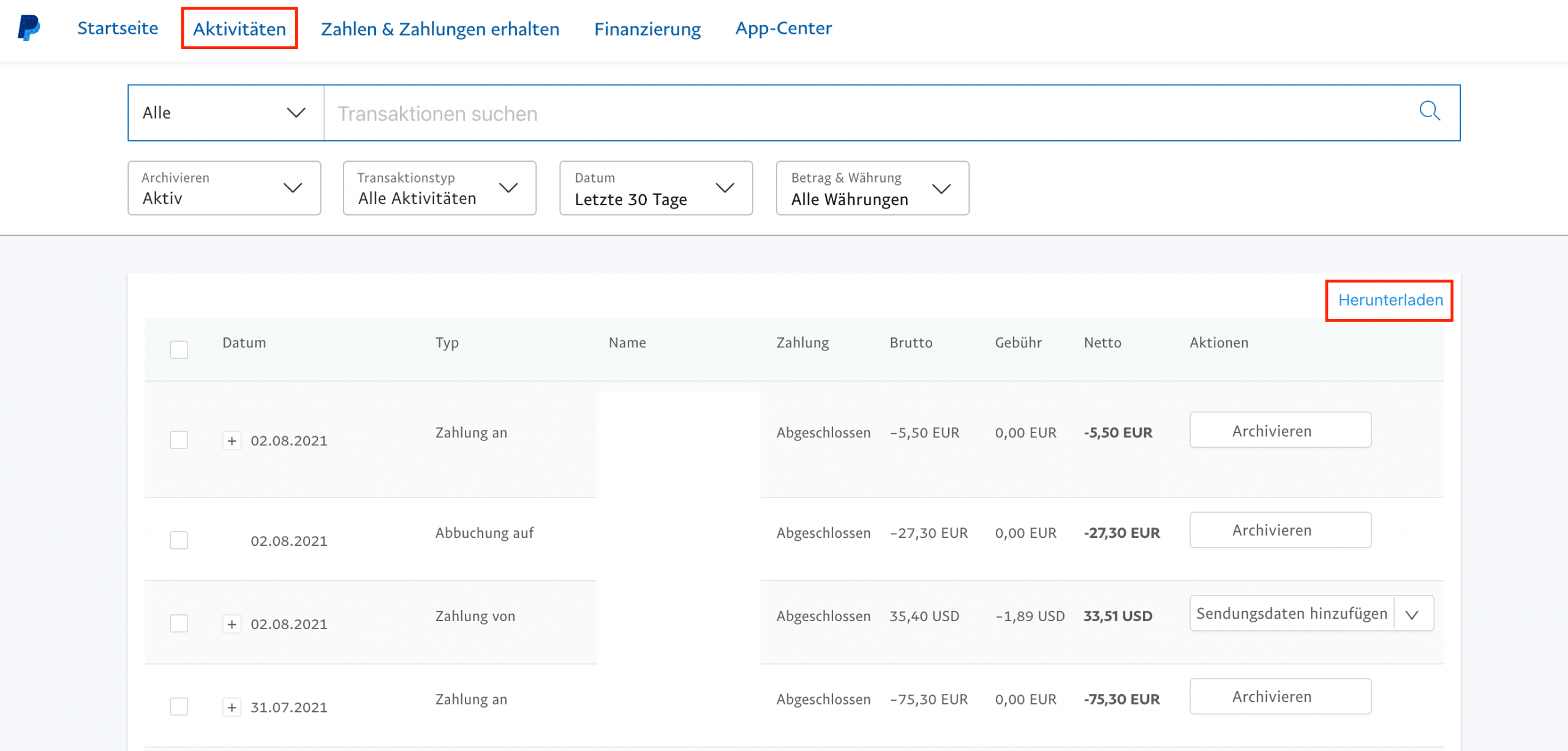
This view shows all transactions for different time periods, currencies and activities.
- If you want to download the Paypal invoices, click on the link in the right corner **“Download” **and comes to a new page.
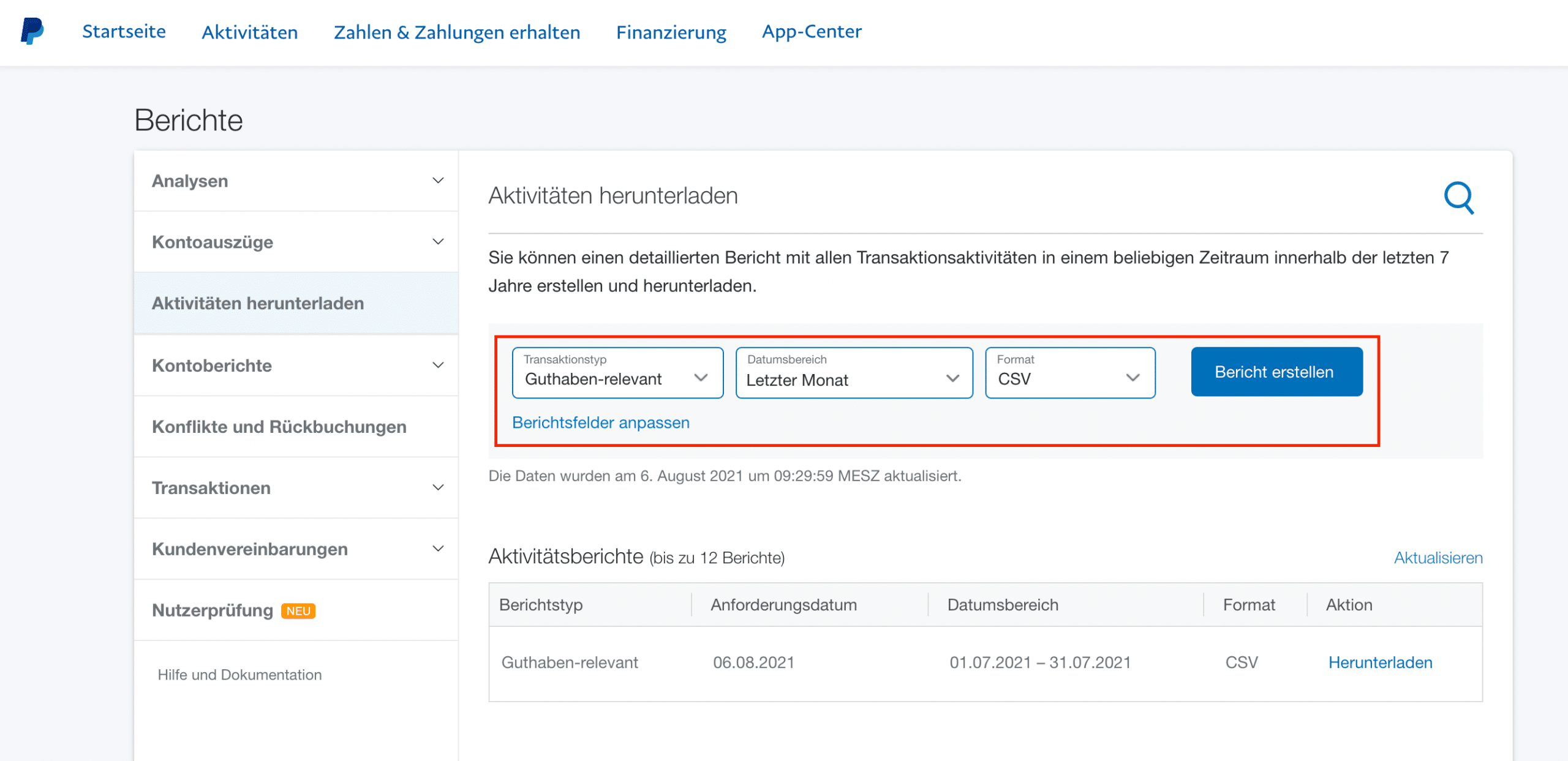
There you select the parameters for the transaction type, period and data format.
Tip: Of course you can also view your Paypal account statement Download automatically with GetMyInvoices let.
Processing PayPal account statements
For example, the excerpts can be imported into a table edit in CSV format or simply printed out as a PDF.
These printouts are then booked in the same way as the bank statements as described above.
Timing of Paypal transactions
The accounting payment time is undisputedly the one that is noted as the end of the transaction on the Paypal account statement.
Since there are no time delays with Paypal transactions like with banking transactions, the value date is omitted.
Paypal transactions are processed just a few minutes after execution.
Paypal chargebacks/partial refunds
Refunding payments that have already been received is easy: using the corresponding button, this Paypal transaction can be carried out in just a few clicks.
Depending on the reason for the refund, this is recorded in the corresponding general ledger account, such as warranty service, exchange, etc.
The booking record was then: SK “Paypal” / debtor.
The amount is now in the customer account. From there he will either written off via the guarantee etc. ledger account or the invoice is canceled.
The booking record for this is: Customer / corresponding general ledger account.
Foreign currencies
**If the Paypal account is managed in euros, all Paypal transactions will be converted into euros. **
You can transfer money yourself in a foreign currency. The resulting fees are recorded as bank fees.
Paypal transaction conflicts
Frequently asked questions regarding Paypal also include:
- How can I reverse a Paypal payment?
- How can I contact Paypal?
By this, users usually mean how they can get back money they have paid. This is entirely possible. If there are conflicts between retailers and customers, Paypal offers support.
Such difficulties must be dealt with in the event of an emergency no later than 180 days after the Paypal transaction be reported.
A valid shipping receipt with
- shipping company,
- shipping date,
- Name and address of the recipient as well
- Name and address of the sender
relieves the seller. If the claims are justified, Paypal will help you get the entire purchase price back.
Conclusion:
Even though it looks complicated at first glance, Paypal accounting is simple. You post Paypal payments in the same way as your normal bank receipts.
Treat the Paypal account as if it were a normal bank account - just like that of your house bank - and your Paypal transactions will be transparent and traceable in accounting.
This means that they comply with the GoB – the principles of proper accounting.