Measures to limit the spread of the corona virus are currently increasingly forcing people into isolation and paralyzing usual processes in companies. Conferences and trade fairs are being canceled, trips are being canceled and working from home is increasing significantly. According to the digital association Bitkom, one in five working people is working from home for the first time due to COVID-19. Many useful online tools support this remote work in a wide variety of areas. We have put together a few for you.
Digital invoice management with GetMyInvoices
GetMyInvoices not only automatically collects documents from a variety of sources and forwards them to almost any application. The invoice management solution also enables location-independent collaboration via the cloud. Employees, accountants and tax advisors worldwide can access the same documents via the web browser.
Digital signing with DocuSign
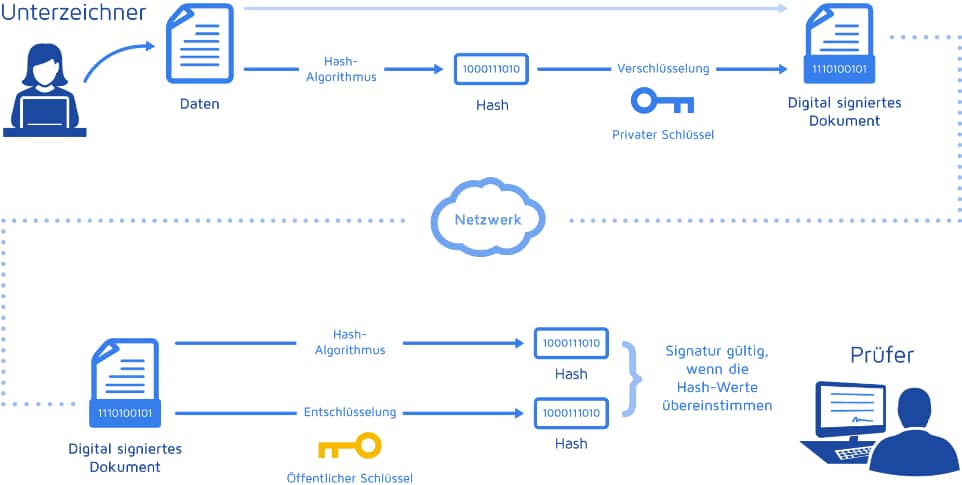
Approve an order, close a deal or sign an agreement in a snap - DocuSign helps sign, prepare, execute and manage contracts electronically. The free trial account is valid for 30 days.
Fast communication with Webex, Zoom & Co.
Against the backdrop of the challenges presented by Corona, Cisco has expanded its free Webex offering. According to the blog post, the free version now allows, among other things, meetings for up to 100 participants and unlimited use. In addition, Cisco provides free licenses for 90 days to companies that are not yet Webex customers. This means that conferences and online workshops are possible at no additional cost.
Another useful tool is zoom , which offers unlimited one-on-one meetings in the free version and 40 minutes in group meetings for up to 100 participants.
Slack helps make teamwork more productive. The free version allows limited access to chat messages and one-on-one audio and video calls between team members.
Microsoft Teams – a service integrated into the Office 365 office suite – combines chat, meetings, notes and attachments.
Data exchange with cloud storage
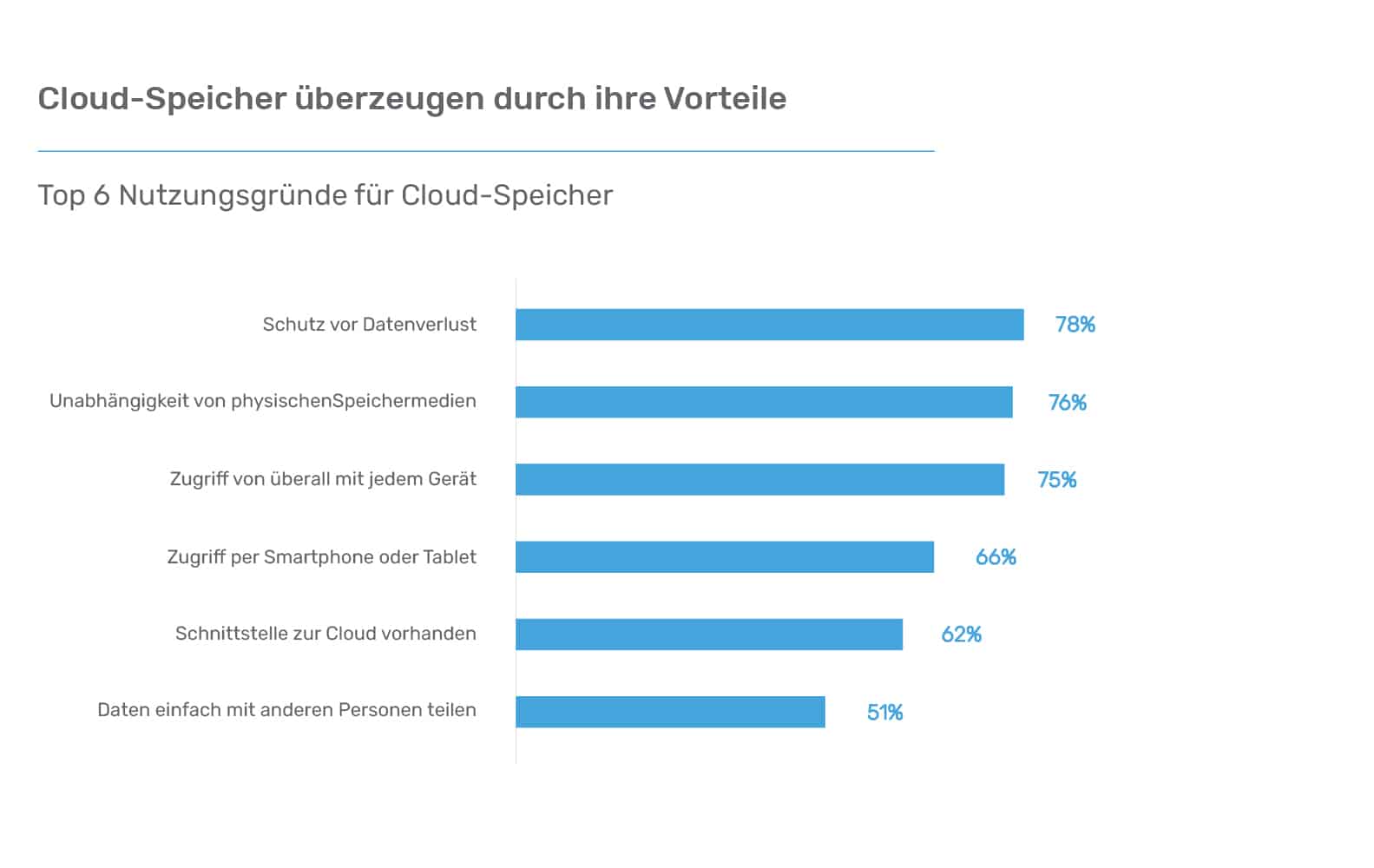
Dropbox is a widely used file hosting service that stores data in the cloud and synchronizes it with connected computers. This means users have access to their documents anytime, anywhere. Teams can also easily work together on documents via Dropbox.
Also at Google Drive it is a file hosting service. With it, users can store documents of any kind in the cloud and access them from any smartphone, tablet or computer. Google Drive also makes it easy to share, download, and collaborate on documents. By the way, GetMyInvoices can be easily connected to Dropbox or Google Drive via interfaces for document exchange.
Document management
With SharePoint Users can access, store, structure and share information from anywhere and from almost any device. All you need is a web browser such as Microsoft Edge, Internet Explorer, Chrome or Firefox. SharePoint thus facilitates cross-team collaboration, for example within the context of projects.
The d.3ecm system helps companies organize information sustainably. More and more business processes are being mapped in this way, so that transparency and job satisfaction increase noticeably. Thanks to integrable HTML5 technology and mobile apps for various operating systems, employees can consistently access information and processes.
Digitize incoming and outgoing mail
Dropscan digitizes sent mail, documents, receipts, file folders and other paper documents and makes them available within a short time as fully searchable PDF files in the cloud and therefore regardless of location.
The counterpart for the outgoing mail is Binect , because this allows companies or tax advisors to send letters digitally without printing them or taking them to the post office.