Never sort receipts again! What many founders still dream of is easier than expected to be achieved with a paperless office. You can find out here how you can digitize your office, which tools will help you and practical tips for implementation.
Table of contents:
- Paperless office: what is it?
- Advantages
- Step by step instructions
- software
- Legal Aspects
- Get your digital office easily with GetMyInvoices
The most important answers about the paperless office:
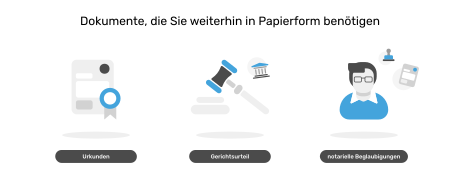
In principle, the tax office accepts all digital documents, receipts and invoices. These are subject to the “Principles of Proper Accounting” (GoBD). Attention: Courts only accept documents, court judgments and notarial certifications as originals.
This is how the transition to a digital office works:
- Record actual status & target status
- Define folder structure and document management
- Name documents consistently
- Implementation step by step
- Avoid paper consistently in the future
The document management system is the heart of the paperless office. It optimizes the archiving and categorization of your documents. GetMyInvoices invoice management software makes your paperless office even more efficient.
A digital office saves valuable resources and increases productivity thanks to intelligent solutions. The benefits also include:
- No input errors
- Time savings through automated work processes
- Location-independent work opportunities and employee retention
- competitiveness
- Simplified communication
- Material savings and improved CO2 balance
Companies waste a lot of time and Money in the fight against the daily paperwork . The triangular relationship between entrepreneur, tax advisor and accounting is now so developed that founders are more concerned with paperwork than with the actual main business.
But that need not be! In almost all business areas it is now possible to completely do without paper. According to that Digital Office Index 2022 Every third company has already at least partially made the leap into the digital world - and the trend is rising! So that you don’t get left behind, it’s high time to digitize your office!
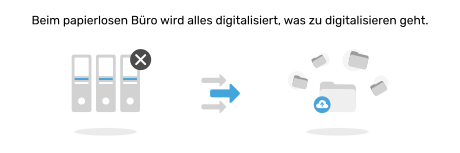
What is a paperless office?
Digitizing your office means nothing more than as much as possible to avoid paper-based processes. Boxes full of receipts that have to go to the tax advisor, post-its on the laptop and overflowing file folders are banished from everyday business life.
The following elements make up the paperless office:
- You store documents on digital storage media such as hard drives or cloud services
- Paper documents are digitized and archived via scanner
- You send documents electronically, for example via email or industry-specific software solutions
- You use legally valid electronic signatures
The paperless office – clear advantages
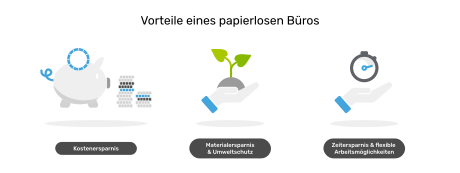
By consciously avoiding paperwork, you can make your accounting easier, faster and more sustainable. The digital office also saves a lot of space, especially at home. The advantages also include:
- Increased efficiency: Documents and files can be found more quickly thanks to an integrated search function
- No transmission errors due to manual entries
- Automated work processes and time savings
- Flexible work options and higher employee satisfaction
- Increased competitiveness
- Simplified communication with the tax advisor and tax office
- Material savings, image improvement and improved CO2 balance
In our opinion, the paperless office has no real disadvantages. Depending on how advanced you are with your digital office, the start may be a little bumpy take longer .
The paperless office: This is how it works
If the benefits of a paperless office sound tempting, all you need to digitize your office is the right tools and a little training.
Step 1: Good planning is the be-all and end-all
Start with an inventory and become aware of in which department, by whom, why and how much paperwork is being done. You then set realistic goals and timelines for the gradual digitalization.
Step 2: The right folder structure for the paperless office
You then have to define a sensible folder structure for the entire company, including all departments. Because if every employee handles this differently, the changeover quickly becomes chaotic and non-transparent.
Step 3. Document management
You can finally say goodbye to your file folders! Because now it’s time to digitize existing documents. It is important to prepare the data so that it can later be found in the digital folder system. This also includes consistently naming all files the same way.
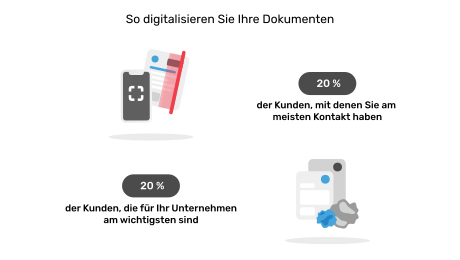
If you have a lot of folders, it’s best to follow the Pareto principle when scanning:
- 20 percent of the customers who are most important to you
- 20 percent of the customers you have the most contact with
You only digitize the remaining documents when you have them in your hand.
Software and helpful tools for digitizing the office
Scan documents and you’re done - is it that easy? Not quite. In order to get the most out of office digitalization, a proper document management system (DMS) is crucial. This term sometimes covers very different software solutions that you can use to archive and manage your documents. Software solutions like Caya We even go one step further and digitize your entire inbox for you. A smartphone or tablet including a pen is also useful. This allows you to scan your documents, then sign them directly and create digital notes.
Legal aspects of the paperless office
You already guessed it: legal obligations that are imposed on you by the legislature also apply to the digital office.
As with paper-based accounting, electronic files are subject to the Retention obligation and the Principles of proper accounting (GoBD). However, with the new version of the GoBD published in 2019, nothing stands in the way of a paperless office. Accordingly are:
- Cloud-based systems officially accepted for storage,
- digitized documents recognized as proof,
- and allows scanning with a smartphone or tablet.
It doesn’t work completely without paper: courts only accept documents, court judgments and notarial certifications in paper form.